
INSTALL · NAVIGATE · UNDERSTAND
Manual
Install the published package, learn the controls and check the firmware compatibility notes.
Install
Do not install from the repository source ZIP. The release asset is the packaged application intended for the muOS archive installation flow.
- 01Open the official releases
Choose the published
Browse GitHub Releases ↗.muxappasset from the repository Releases page. - 02Copy the package to the archive path
Place the downloaded package in
SD1/ARCHIVE/. - 03Install with the native archive manager
On the handheld, open Applications → Archive Manager and install the package.
- 04Launch from Applications
Keep the installed application directory and launcher names intact. Existing installs use
Void-Desk/andmux_launch.sh.
Navigation icons
These PNGs are the existing menu and hub symbols from the repository. They identify destinations; they do not depict complete application screens.


THE FORGE
This is the actual THE FORGE application screen capture. It is deliberately kept separate from the hub icon shown above.
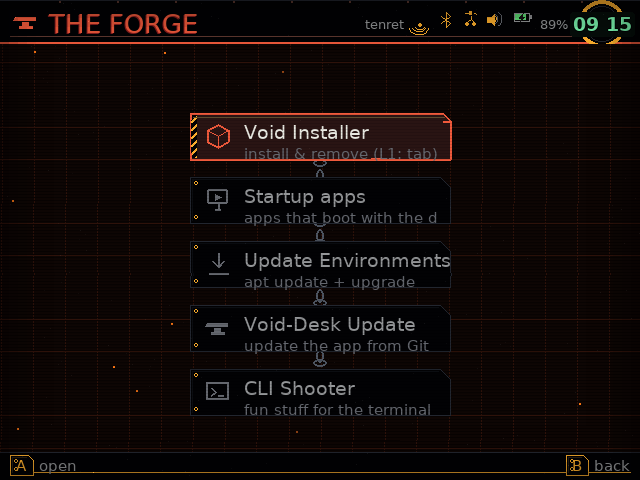
forge-menu.png is the screen capture. the_forge.png is the navigation icon.Compatibility
Firmware family is only one part of controller resolution. Device model and controller GUID must be evaluated together.
| Firmware line | Position | Policy |
|---|---|---|
| 2606.0 Andromeda | CURRENT TARGET | Validate exact device and controller GUID combinations. |
| 2601.0 Jacaranda | LEGACY | Keep a separate legacy profile family. |
| 2601.1 Funky Jacaranda | LEGACY VARIANT | Do not merge metadata until equivalence is proven. |
| 2612 Supernova | IN DEVELOPMENT | Preview only until official release and device tests. |
| Unknown / other | UNVERIFIED | Generic safe baseline plus manual calibration. |
Controller safety — never infer a certified physical mapping from CI or a graphics screenshot. The profile key is firmware release + device model/board + SDL controller GUID.